
AI meeting notes that say who does what
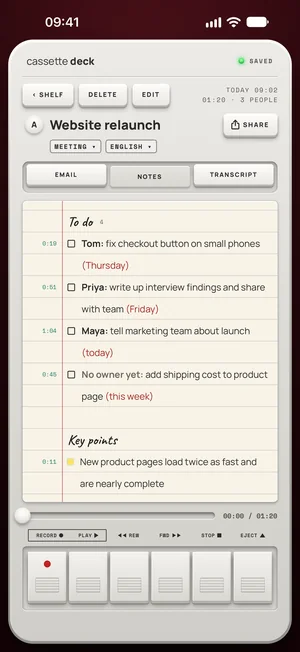
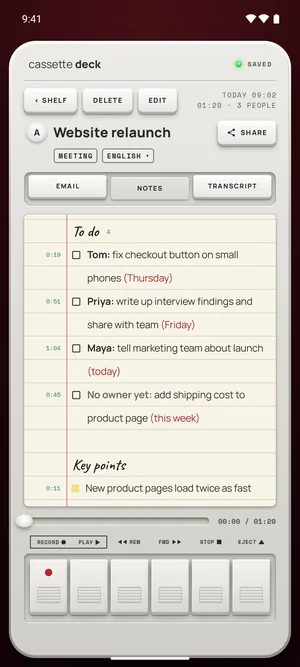
When you stop a meeting tape, Cassette writes AI meeting notes: the tasks grouped by the person doing them with the day they said, the decisions, the key points under their topics and the questions left open, each line tied to its moment on the tape.


Why notes, when you have the transcript
An hour-long meeting makes a transcript thousands of words long. Nobody reads that to find out what they have to do. Notes are the part you act on: the tasks with their owners and days, what was decided, what's still open.
Tasks by person
Each task reads Name: what to do (day). When a meeting hands out work and nobody takes one task, it says No owner yet instead of guessing. Repeats are folded together and empty tasks are left out.
Decisions, topics, open questions
Decisions are kept apart from the discussion, the key points sit under the topics the meeting got to, and the open questions are listed at the end, so a week later you can see what was settled and what wasn't.
On Android, key points come under topics on phones with Cassette's notes model; tasks by person are on every phone.
Checked against the tape
Every line keeps the moment it came from: tap it to hear what was really said. A small ? marks a name or an amount the transcript wasn't sure of.
Free to download. Recording is free and unlimited, and tapes under 3 minutes get their transcript and notes free.
Who writes them
- iPhone, iPad and Mac: Apple's own models, on the device, or with Apple's Private Cloud Compute on iOS 27, never an outside AI service. Devices without Apple Intelligence get simpler notes, written on the device.
- Android: Cassette's own notes model, on the phone, on phones with 8 GB of memory or more. Other phones get simpler notes from the tape.
How to use them
- Record the meeting, in the room on your phone or on a call on your Mac.
- Press STOP, and the notes are written.
- Check and edit: tap a line's time to hear it, and edit any line on the notes page.
- Share them: the follow-up email, your notes app, or a Share Link.
What's different
- No owner yet instead of a guessed name.
- Repeats folded together and empty tasks left out, so the list stays short.
- Every line tied to its moment on the tape.
- Eight shapes of notes, picked from what was recorded (on Android, on phones with Cassette's notes model).
Notes for other recordings
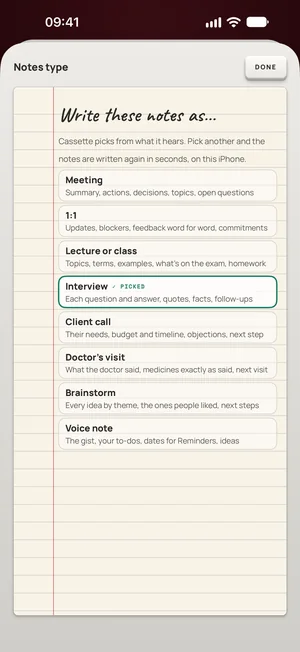
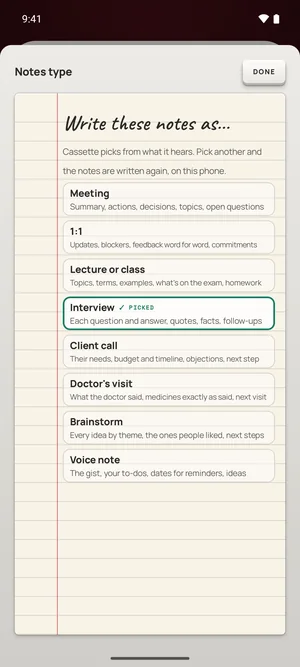
A meeting is one of eight shapes. A lecture, an interview or a voice note gets the notes that fit it.
| Type | What its notes hold |
|---|---|
| Meeting | Summary, actions, decisions, topics, open questions |
| 1:1 | Updates, blockers, feedback word for word, commitments |
| Lecture or class | Topics, terms, examples, what's on the exam, homework |
| Interview | Each question and answer, quotes, facts, follow-ups |
| Client call | Their needs, budget and timeline, objections, next step |
| Doctor's visit | What the doctor said, medicines exactly as said, next visit |
| Brainstorm | Every idea by theme, the ones people liked, next steps |
| Voice note | The gist, your to-dos, dates for reminders, ideas |
Questions
Can I change the notes?
Yes. Edit them on the notes page. If you change the type, the notes are written again in that shape. On Android, changing the type needs a phone with 8 GB of memory or more, once Cassette's notes model is on it.
Does it write a follow-up email?
Yes, for meetings, client calls, interviews and brainstorms: a subject, a greeting, the recap and the action items.
Keep reading
- AI note taker: how to choose oneWhat to look for, and the free options first.
- How to take notes in a meeting using AIStep by step.
- MeetingsIn the room and on calls.
Free to download. Recording is free and unlimited, and tapes under 3 minutes get their transcript and notes free.