
Interview transcription with the questions already sorted
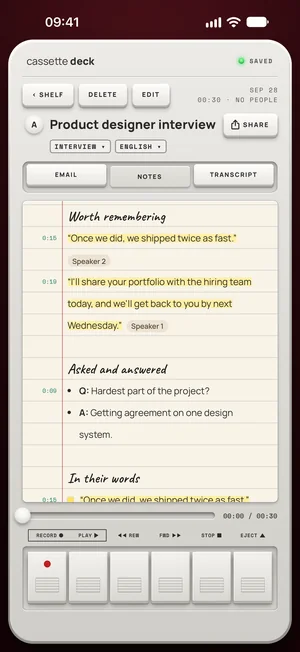
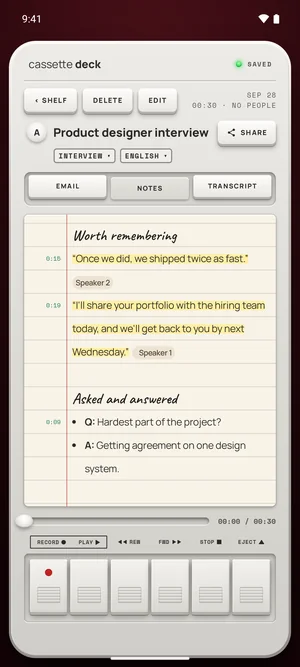
Cassette records an interview and writes interview notes: each question with its answer, the quotes word for word, the facts that came up and the follow-ups to send, next to a transcript where every line plays its moment.


Why record an interview
An interview goes better when you are looking at the person, not at a keyboard. And a quote has to be exact: a paraphrase from memory is not a quote. With the interview on tape you can follow the conversation where it goes, and Cassette lays out the questions, the answers and the exact words afterwards.
What interview notes hold
- Each question and answer, in the order they were asked.
- Quotes, word for word, with the moment they were said.
- Facts: names, numbers and dates that came up.
- Follow-ups: what you promised to send or check.
Interviews also get a follow-up email draft, addressed to the people who came up.
How to use it
- Set up: put the phone between you, a little closer to the person you are interviewing, and ask if you may record.
- During: press MARK at the answer you know you'll use.
- After: read the interview notes: each question with its answer, the quotes, the facts, the follow-ups. Tap a quote's time to hear it before you use it.
- File it: copy the quotes, save the transcript as a PDF or a Word file, or send the notes to your notes app.
What Cassette does differently for interviews
- Questions paired with their answers, not one long transcript.
- Quotes with their moment, so you can check the words against the tape.
- Names filled in on iPhone, iPad and Mac when you choose to remember a voice, kept on the device.
- Files from any recorder: an interview recorded elsewhere comes in with ADD FILE.
Your phone is the recorder
If you carry a separate recorder as a backup, you may not need to. Cassette records on the phone you already have and saves the audio every few seconds while it records, and the watch can record too when the phone is in a bag.
A transcript you can check
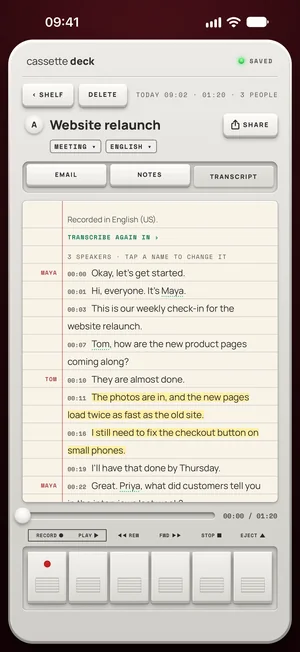
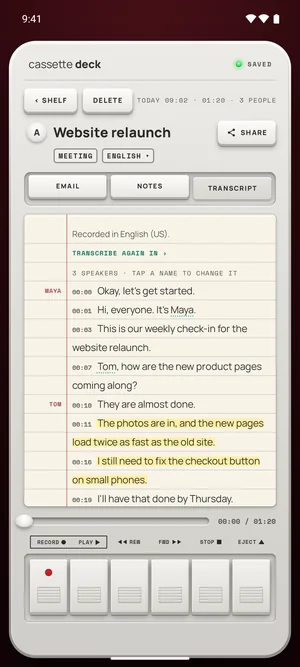
Every line of the transcript has its time. Tap a line and the tape plays from there, so a quote can be checked against the recording before you use it. A small ? marks a name or a number the transcript wasn't sure of.
Names, remembered on your iPhone
On iPhone, iPad and Mac, after you name a speaker Cassette asks, for example, Remember Priya's voice? Only if you choose REMEMBER does it keep a voice profile: numbers that describe the voice, not audio, on the device only and left out of every backup. The next time that person is on a tape, their name is filled in.
Free to download. Recording is free and unlimited, and tapes under 3 minutes get their transcript and notes free.
Before you record
Ask first. Whoever you are recording should know about it, some places require everyone's consent, and it is the decent thing to do.
Questions
Can it record a phone interview?
Not a phone call on iPhone: a call pauses the tape. A video call on a Mac, yes: Cassette records what the Mac plays and your microphone.
Can I bring an interview I already recorded?
Yes. Share the audio file to Cassette or press ADD FILE on the Shelf, on iPhone, iPad, Mac and Android.
Are remembered voices on Android?
Not yet. Remembered voices are on iPhone, iPad and Mac.
Keep reading
- TranscriptionLanguages, offline use and where the transcript is written.
- PodcastsEpisodes get interview notes too.
- Add a recording you already haveFiles from another recorder.
Free to download. Recording is free and unlimited, and tapes under 3 minutes get their transcript and notes free.