
Transcription, every word with its moment
Cassette writes every word of a recording with the time it was said, and a tap on any line plays that moment. Once your language has downloaded it works offline, on iPhone, iPad, Mac and Android.


Why a transcript helps
Audio is easy to keep and hard to use. You can't skim it, search it or copy a sentence out of it. A transcript you can read, with every line one tap from its moment, turns a recording into something you can find things in.
Every line tied to the tape
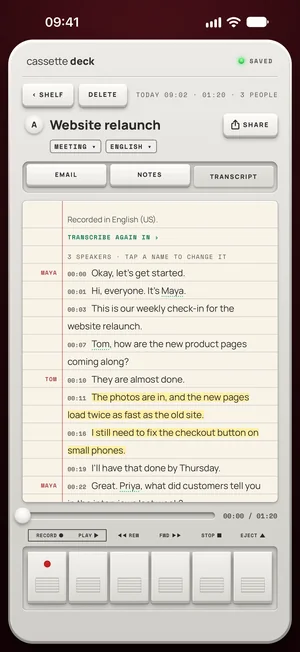
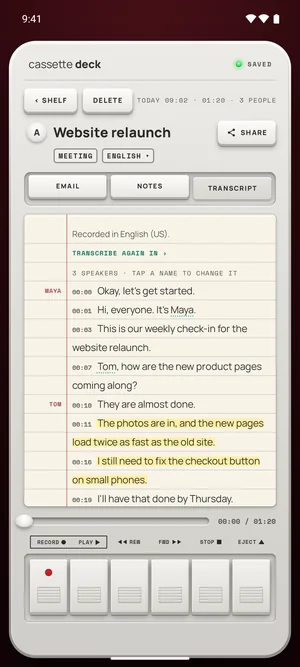
The transcript has its own tab. Each line shows its time, and on iPhone, iPad and Mac the speakers' names when Cassette can tell the voices apart. Tap a line and the tape jumps to it. On iOS 26 and later the transcript is written while you record.
Where the transcript is written
- iPhone, iPad and Mac: Apple speech recognition, on the device wherever it supports your language there; otherwise that recording may be sent to Apple to transcribe. Switch on On-device only in your profile to keep tapes on the iPhone.
- Android: on the phone, always, by the speech model that comes with the app.
Your languages
Set the languages you record in, in your profile, and Cassette picks the right one for each tape. Each language downloads once, then works offline. Recorded in the wrong one? Open the tape and transcribe it again in another.
On iPhone, the notes come in the app's language, English, even from a tape in another language, and WRITE AGAIN IN writes them in the language that was spoken.
Free to download. Recording is free and unlimited, and tapes under 3 minutes get their transcript and notes free.
A small ? where it wasn't sure
Speech recognition sometimes mishears a name or a number. When it says so, the notes mark that word with a small ?, and a tap plays the moment so you can check it.
How to use it
- Set your languages once, in your profile.
- Record, or add a file you already have.
- Open the Transcript tab when you stop. On iOS 26 and later you can watch it being written while you record.
- Tap a line to hear it, search the Shelf for any word said, or save the transcript as a PDF or a Word file.
What's different
- Offline once your language has downloaded.
- On Android, always on the phone, by the speech model that comes with the app.
- It says when it wasn't sure, with a small ? on a doubtful name or number.
- No minute meter on recording, on any plan.
Questions
Does it work in airplane mode?
Yes: recording always, and the transcript and notes once your language and, on Android, the notes model have downloaded.
How long can a recording be?
Recording has no minute meter and no time limit. On the free plan, tapes under 3 minutes get their transcript and notes free, and longer ones count toward 2 free tapes a month.
Keep reading
- Meeting transcription appTranscribe meetings in the room and on calls.
- InterviewsQuestions, answers and quotes.
- Add a recording you already haveTranscribe an audio file.
Free to download. Recording is free and unlimited, and tapes under 3 minutes get their transcript and notes free.