
Sales call notes that keep the next step
Cassette records a client call on your Mac, or a client meeting on your phone, and writes client call notes: what they need, their budget and timeline, the objections they raised, and the next step you agreed.


Why record a client call
On a sales call you want to listen for what the client needs, not type it. Afterwards, the details that matter most are the ones that slip: a budget, a date, the objection that came up twice. Notes that keep the client's words, with the next step and who owns it, make the follow-up faster and a handover to a colleague cleaner.
Record the call on your Mac
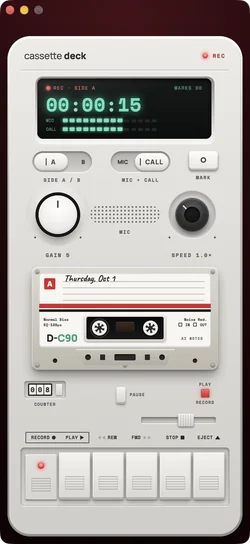
On a Mac, Cassette records what the Mac plays and your microphone together, on macOS 15.2 or later, so a call on any app is recorded without a bot joining it. When a call starts in a meeting app, Cassette can offer to record it: RECORD or NOT NOW, and nothing is recorded unless you press RECORD.
What client call notes hold
- Their needs: what the client is trying to get done.
- Budget and timeline, as they said them.
- Objections: what stood in the way.
- The next step, with who does it and when.
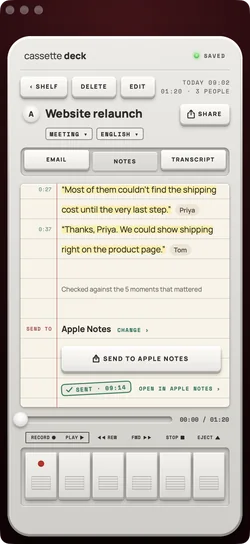
A client call also gets a follow-up email draft, addressed to the people who came up.
Into your notes, or your team's
Send the notes to OneNote, Notion, Apple Notes, Evernote or Google Keep from the SEND TO line, or save them as a PDF or a Word file for the account record.
Free to download. Recording is free and unlimited, and tapes under 3 minutes get their transcript and notes free.
How to use it on a call
- Before the call: open Cassette on your Mac. When the call app starts using the microphone, Cassette can offer RECORD.
- Tell the client you are recording, at the start.
- During: press M to mark the moment they name a budget or a date.
- After: read the client call notes, send the follow-up email draft, and copy the next step into your CRM.
What Cassette does differently on sales calls
- No bot in the call, so the client sees only you.
- Notes shaped for a client call: needs, budget and timeline, objections, the next step.
- In person too: a client meeting over coffee is recorded on your phone.
- One purchase across iPhone, iPad and Mac.
No extra hardware
You don't need a call recorder or a headset that records. The Mac you take the call on records it, and the phone in your pocket records the meeting in person.
Before you record
Tell the client you are recording, at the start of the call. Some places require everyone's consent, and it is the right way to start.
Questions
Can it record a phone call with a client?
No. On iPhone a phone call pauses the tape. Use your Mac for calls, or record an in-person meeting on your phone.
Does it connect to my CRM?
No. Cassette sends notes to notes apps and documents. Copy them into your CRM, or save a PDF.
Keep reading
- Record calls on a MacWith no bot in the call.
- AI meeting notesOwners, dates, decisions.
- Send to notes appsWhere the notes can go.
Free to download. Recording is free and unlimited, and tapes under 3 minutes get their transcript and notes free.