
Ask your recordings a question
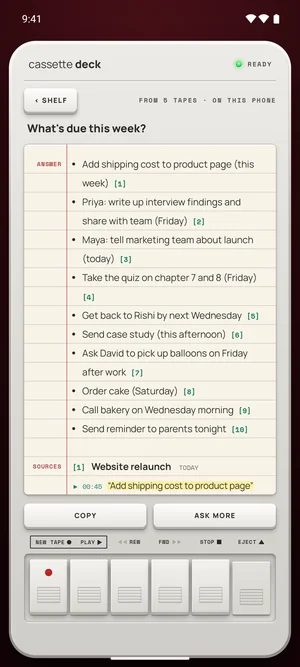
Press ASK on the Shelf, type a question like "What's due this week?", and Cassette answers from what your tapes say, listing the tapes the answer came from.


Why ask instead of scroll
Weeks of recordings are a lot of audio, and the question is usually small: when is it due, what did we decide, who said they'd send it. Ask answers that across every tape, with the tapes it came from, so you don't have to remember which meeting it was.
Questions across every tape
Ask about dates, owners, decisions or numbers: What did we decide about the price?, When is the launch?, What did Priya say she'd send? The answer is written from your tapes, each part numbered with the tape it came from, so you can open that tape and check.
Answers from what was said
Ask answers from your recordings, not from the web. When no tape says it, Cassette tells you so instead of guessing.
Free to download. Recording is free and unlimited, and tapes under 3 minutes get their transcript and notes free.
How to use it
- Press ASK on the Shelf.
- Type a question in plain words, like "What's due this week?" or "What did Priya say about the budget?"
- Read the answer, each part numbered with the tape it came from.
- Open a tape from the answer to hear the moment for yourself.
Questions people ask their tapes
- "What did I promise to send this week?"
- "When did we say the launch is?"
- "What did the professor say is on the exam?"
- "What did the client say their budget was?"
On every device
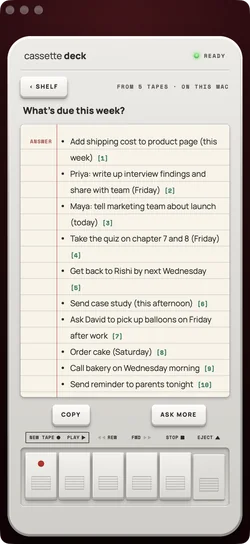
Ask is on iPhone, iPad, Mac and Android. On iPhone you can also ask with Siri: say "Ask Cassette".
What's different
- Answers only from your tapes, not from the web.
- It says so when no tape answers the question, instead of guessing.
- Every part of an answer names its tape, so you can check it.
Questions
Does Ask send my tapes anywhere?
On iPhone, iPad and Mac, Ask uses Apple's models, never an outside AI service. On Android it runs on the phone.
Can I ask about one tape only?
Ask works across your tapes, and each answer names the tapes it used.
Keep reading
- AI meeting notesWhat each tape's notes hold.
- MeetingsOwners and dates to ask about.
Free to download. Recording is free and unlimited, and tapes under 3 minutes get their transcript and notes free.