
How to turn a voice memo into a to-do list
Written by the team that builds Cassette, so we are not neutral about it. Updated 22 November 2026.
For one task at a time, the free way is already on your phone. On iPhone, say "Hey Siri, remind me to call the bakery tomorrow" and it goes into Reminders. On Android, ask Gemini to "add call the bakery to my tasks" and it goes into Google Tasks. For a longer memo with several tasks in it, record it in an app that lists them for you. In Cassette you press RECORD, talk through everything on your mind, and press STOP. The notes give you the gist, a list of to-dos with the day you said for each, and your ideas kept apart.


One task at a time: use your phone's assistant
If you only need to catch one thing, you don't need a recording at all. Say it to the assistant and it lands in a list.
On iPhone, say something like "Hey Siri, remind me to order the cake on Saturday." Apple's page on creating reminders shows you can also ask Siri to add an item to a named list, such as your groceries list. The reminder appears in the Reminders app, with an alert at the time you gave.
On Android, open Gemini and say "Add order the cake to my tasks" or "Remind me on Saturday at 10 to order the cake." Google's help page on tasks and reminders in Gemini says this goes to Google Tasks, and on some Samsung phones to Samsung Reminder. Google says this needs Google Workspace connected in Gemini.
This works well for single items. It works less well when you talk for a minute about a whole day: the party, the bills, the call you owe someone. An assistant takes one request at a time. A voice memo holds all of it, but then you have to listen back and write the list yourself.
Several tasks at once: record a memo and get the list
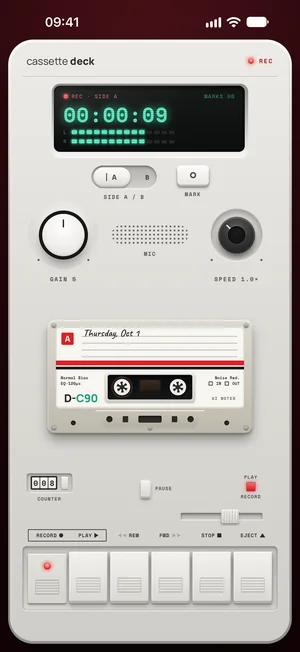
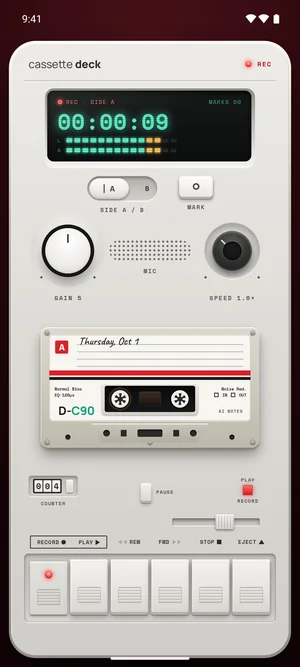
Cassette looks like a tape deck. You talk, it records, and after you press STOP it writes the notes. It runs on iPhone and Android, and the steps are the same on both.
- Press RECORD. Say everything on your mind, in any order. You don't need to say "task one, task two."
- Say the day when there is one. "Order the cake by Saturday" or "call the bakery Wednesday" gives that to-do its day.
- Press STOP. Cassette writes the transcript, then the notes.
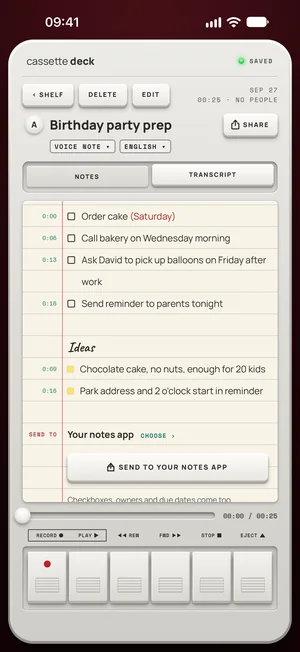
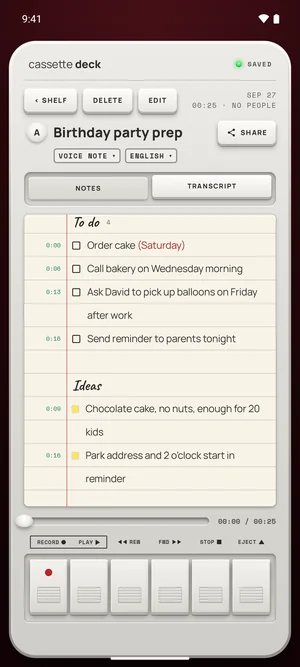
When you talk to yourself, Cassette picks the Voice note type. Its notes have three parts:
- The gist, one line on what the memo was about.
- Your to-dos, each with a checkbox, the time on the tape where you said it, and the day when you said one.
- Your ideas, kept apart from the tasks, so a thought like "chocolate, no nuts" doesn't turn into a chore.
Free to download. Recording is free and unlimited, and tapes under 3 minutes get their transcript and notes free.
If the memo was taken for something else, such as a meeting, tap the type stamp under the title, choose Voice note, and the notes are written again. This works on iPhone and Android.
Get the to-dos into your task app
Send the notes to your notes app. The SEND TO line at the foot of the notes sends them to Notion, OneNote, Evernote or Google Keep, to Apple Notes on iPhone, iPad and Mac, or to Samsung Notes on a Samsung phone. Cassette says the checkboxes and due dates come too.
Put them in Reminders on iPhone, iPad or Mac. Cassette adds a Get Action Items action to Apple's Shortcuts app. It gives you the to-dos from your newest tape, one per line. In Shortcuts, make a new shortcut with Get Action Items, then a Repeat with Each action, and inside it Add New Reminder with the Repeat Item. Run it after a memo and each to-do becomes its own reminder. You can also say "Get my action items from Cassette" to Siri.
Tips for a memo that turns into a clean list
- Say the verb first. "Call the bakery" makes a clearer to-do than "the bakery thing."
- Name a day out loud. A to-do only gets a day when you said one.
- One memo per topic. A short memo about the party and another about work give you two tidy lists.
- Check the list against the tape. Each to-do shows where on the tape it came from, so a wrong one is quick to check.
What you need for the to-do list
The Voice note layout, with its to-dos, ideas and times on the tape, is written for memos in English. On iPhone, iPad and Mac, a memo in another language still gets a to-do list where Apple Intelligence works in that language, without the ideas or the times. On Android, the to-do list is for memos in English.
On Android, Cassette picks the type for you on a phone with 8 GB of memory or more, once its notes model has arrived over Wi-Fi after you install.
On an iPhone or iPad without Apple Intelligence or on a version before 26, or an Android phone with less than 8 GB of memory, you get the recording, the transcript and a few lines heard clearly, with no to-do list.
Before you record
Ask first. Whoever you are recording should know about it, some places require everyone's consent, and it is the decent thing to do.
Questions
Can Voice Memos make a to-do list?
Voice Memos records and, on iPhone 12 or later, can show a transcript in the languages Apple supports, but it doesn't pull out tasks. For one task, ask Siri to remind you. For a memo with several tasks, an app like Cassette lists them for you after you press STOP.
What is the best voice to-do list app?
For single tasks, the one already on your phone: Siri and Reminders on iPhone, Gemini and Google Tasks on Android. For longer memos with several tasks, use an app that writes the list from the recording, like Cassette.
Does Cassette set alerts for my to-dos?
No. Cassette writes the list with the days you said. For alerts, send the to-dos to Reminders with the Get Action Items shortcut on iPhone, iPad or Mac, or add them to your task app.
Is it free?
Recording is free and unlimited. A memo under 3 minutes gets its transcript and notes for free. Longer memos count toward the 2 free tapes a month, and Premium covers every tape after that.
Keep reading
- All featuresWhere this fits in Cassette.
- How to transcribe voice memos to text on iPhone or AndroidTurn a voice memo into text with the tools already on your phone. Steps for iPhone, Mac, Pixel and Samsung, and how Cassette adds a to-do list.
- Which voice recorder app should you use?Do you need a voice recorder app at all? What the free recorder on your iPhone or Android already does, what to check in another one, and where Cassette fits.
- How to get voice notes into NotionRecord on your phone and get the transcript and notes into a Notion page. Steps for Notion's AI Meeting Notes and for Cassette on iPhone, Android and Mac.
- How to speed up or slow down a voice memoPlay a voice recording faster or slower: the speed slider in Voice Memos on iPhone and Mac, what to check on Android, and the SPEED knob in Cassette.
Sources
- Apple Support: Create reminders on iPhone: https://support.apple.com/guide/iphone/create-reminders-iph88463e18/ios
- Apple Support: View a Voice Memos transcription on iPhone: https://support.apple.com/guide/iphone/view-a-transcription-iph00953a982/ios
- Gemini Apps Help: Capture your tasks and reminders with Gemini Apps: https://support.google.com/gemini/answer/15230285?hl=en&co=GENIE.Platform%3DAndroid
- Apple Support: Use Repeat actions in Shortcuts on iPhone or iPad: https://support.apple.com/guide/shortcuts/use-repeat-actions-apdc11deb2c1/ios
Free to download. Recording is free and unlimited, and tapes under 3 minutes get their transcript and notes free.